
If blogging has been on your to-do list since 2022, hi. I see you. I am you. And I finally found something that changed my Sunday afternoons for the better. Read more about how to use AI to write a blog post as a photographer!
Here is the truth about blogging for photographers: you already know it matters. You know Google rewards consistent content. You know a solid blog can bring in inquiries months after you hit publish. But between editing galleries, answering emails, and actually running your business, sitting down to write 800 words about engagement session locations feels like the last thing you have energy for.
That is exactly why I started using AI to write blog posts. Not to replace my voice or cheat the system. To get a first draft on the page so I am not staring at a blinking cursor for 45 minutes before I write a single sentence.
I use Claude, which is an AI writing tool made by Anthropic. And in this post, I am going to walk you through exactly how I use it, step by step, so you can try it yourself. I even made you a free blog template to go with it.
*If you don’t want to learn how to blog and you just need a professional to do it for you, reach out to me here!*
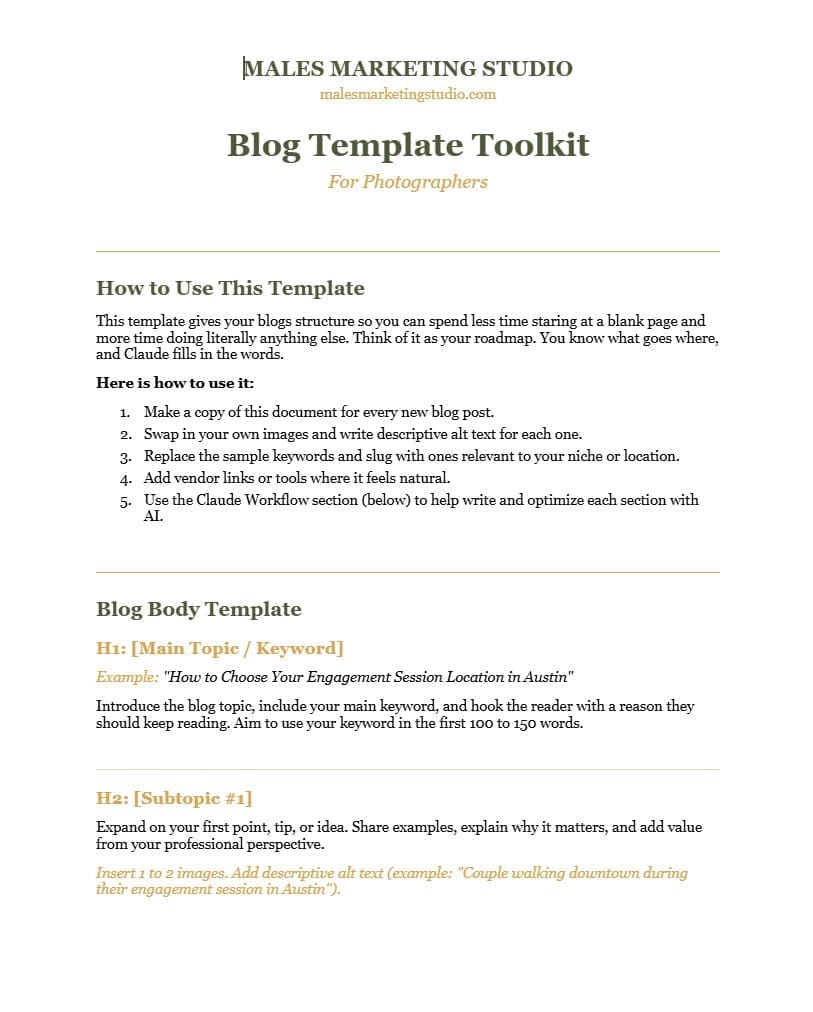
Start With a Template, Not a Blank Page
Before you open Claude or any other AI tool, you need structure. A blank page is where good intentions go to die.
I created a free Blog Template for Photographers that gives you the exact sections your post needs: the H1, the H2 subheadings, the call to action, image placements, alt text reminders, and an SEO checklist. It is the skeleton. AI is the words that bring it to life.
When I say “use AI to write a blog post,” I do not mean open Claude and say “write me a blog about fall engagement sessions” and copy-paste whatever comes out. That is how you end up sounding like every other website on the internet. Instead, you use the template as your roadmap and ask AI to help you fill in each section with direction and context.
Grab the free template first, then come back here. Everything I walk you through below follows that structure.
This Is My Number One Tip On How To Use AI To Write A Blog…
Good SEO is based on strategy. This is the biggest thing people are missing. You can’t just make up a keyword!! You can’t just say, “Hey AI, write me a blog” and think it will rank and do well. Put in the effort to make it worth while.
One of the very best things about Claude is the outside apps and software programs it can connect to. I connect my Claude system to Ubersuggest. This is a program that does keyword research and can tell you what your ideal audience is actually searching for. You can also set up a site audit, check what you are ranking for and plan out keywords for your entire website. Big fan!
When you connect Ubersuggest to Claude, Claude can pull your website data and keyword details instantly. From there you can naturally use your keyword within your blog and use it to help with a meta description and other backend information you will need.
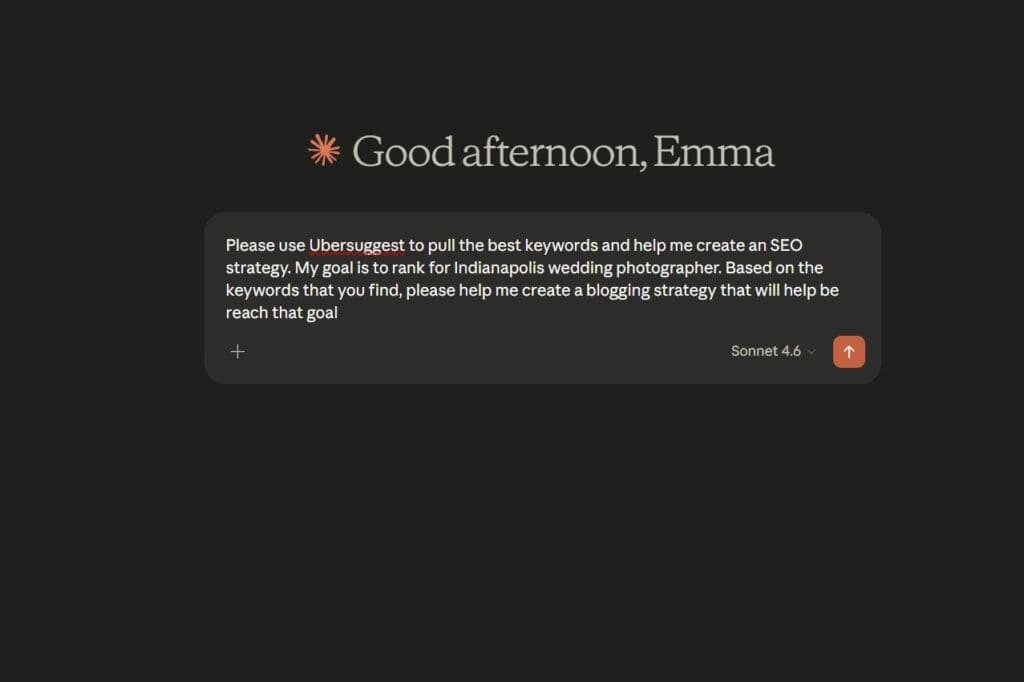
Give Claude Context, Not Just a Topic
This is the biggest mistake I see photographers make with AI tools for blogging. They type something like “write a blog about wedding photography” and then wonder why it sounds generic and flat.
AI is only as good as what you give it. So before you ask Claude to write anything, tell it who you are, what you are writing about, and how you talk.
Here is the exact prompt I give my clients to start with:
“I am a [wedding / family / portrait] photographer in [city]. I am writing a blog post titled [title] and my target keyword is [keyword]. My tone is warm, conversational, and a little funny. Not corporate. I will send you each section of my blog one at a time and ask you to help me write it.”
That one prompt changes everything. Instead of getting something that reads like a press release, you get a draft that actually sounds like it came from a real person with a real business.
Better context in means better writing out. Every time.

Write Section by Section (This Part Is Important To Not Sounding Like A Robot!)
Do not ask Claude to write your entire blog at once. I know it is tempting. But asking AI to write a full 800-word post in one shot is a recipe for generic, robot-sounding paragraphs that all blend together.
Instead, work through your template one H2 section at a time. Paste in the subheading, tell Claude what you want that section to cover, and let it give you a focused draft.
Then read it before you move on. This is where you keep your voice in the blog. If something sounds stiff, tell Claude. You can literally say things like:
- “Make this more conversational.”
- “Add a little warmth.”
- “This sounds like a press release. Make it sound like a photographer talking to a friend.”
You can absolutely tell Claude “rewrite this like a tired mom who is also a professional.” It will. And honestly, it will probably nail it.
This section-by-section approach is what separates photographers who use AI well from photographers who tried it once and hated the results.
Let AI Handle Your SEO Checklist
Here is where AI for photographers gets really powerful, and it is the part most people skip.
After your blog draft is written, Claude can help you optimize it for search. You do not need to be an SEO expert. You just need to ask the right questions. Try these prompts after your draft is done:
- “Write a meta description for this post using the keyword [your keyword].”
- “Suggest descriptive alt text for my blog images based on this topic.”
- “Does my keyword appear naturally in the intro, at least one H2, and the conclusion?”
- “Suggest one internal link and one external resource I should link to.”
This is where blog writing with AI saves you the most time. The SEO polish that used to take me an extra hour now takes about ten minutes. And it is the difference between a blog that sits on page seven and one that actually gets found.
If you grabbed the free blog template, you will notice the SEO reminders section at the bottom matches these prompts exactly. The template and Claude work together like a system. Which is the whole point.
Edit It So It Actually Sounds Like You
This is the real question I get, how to write a blog using AI AND make it sound like me! I am going to be honest with you. AI is not going to write a perfect blog in your voice the first time. Or the second time. But it will get you 80% of the way there, and that last 20% is where your personality lives.
Read your draft out loud. Anywhere it sounds stiff, corporate, or like a stranger wrote it, rewrite that part in your own words. Add one or two details Claude could not possibly know: the venue where your last couple got engaged, the funny thing that happened during a session, the random Tuesday you shot in the rain and it turned out to be your favorite gallery of the year.
Those small, real moments are what make your blog yours. AI gives you the structure and the starting point. You give it the soul.
Pro tip that will save you time long-term: at the end of your writing session, tell Claude “save this writing style to memory.” Next time you start a post, it will already sound closer to you.
Once you do this two or three times, your workflow goes from three hours to about 45 minutes. That is not an exaggeration. That is what I hear from photographers who actually use this system.
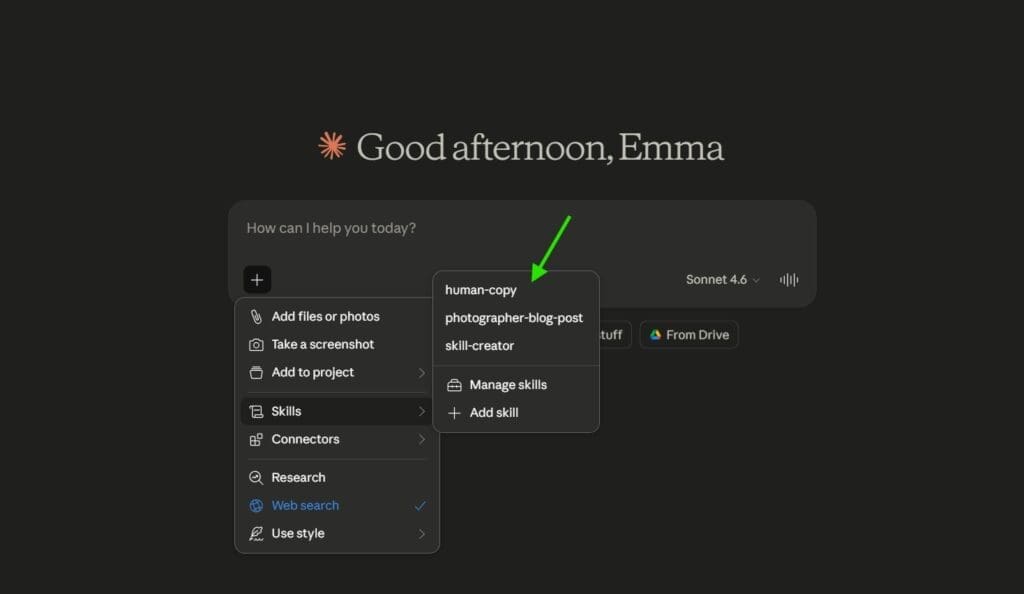
Using Claude Skills To Help You Write Your Blog
This may sound a bit advanced and techy but it was honestly not hard. I built a few “skills” within Claude to teach it to do specific tasks. Skills are very similar to personal GPTs that you train. Claude will use these files to run its answers through before sending the text back to you. Here are some examples of skill files I created
- A skill that makes the writing sound like me and more human. I trained it to avoid AI phrases that everyone recognizes, use natural language and copy my tone
- A skill that is trained on YOAST. This is a tool within WordPress that helps grade your blogs for SEO.
These skills combined with Ubersuggest are the chef’s kiss of blogging tools!
Your Blog Workflow Just Got a Whole Lot Simpler
So here is the short version. Download the free blog template. Open Claude. Give it context about who you are and how you write. Work through the template section by section. Let Claude handle the SEO polish. Then read it out loud and make it sound like you.
That is it. That is the whole system.
Blogging does not have to take your entire Sunday. It does not have to feel like homework. And it definitely does not have to sound like it was written by a committee.
Claude is not going to replace you. It is going to give you your afternoons back!
Ready to try it? Grab the free Blog Template for Photographers and start your next post in half the time. If you aren’t interested in learning how to write your own blogs and need someone else to do this for you…let us take it off your plate! Contact me here.
Start by giving the AI context about your business, your topic, and your writing style. Then work through your blog one section at a time instead of asking for the whole thing at once. Edit the draft in your own voice before publishing. A blog template helps you stay organized so AI fills in the words while you control the structure.
Yes, as long as you edit the output and add your own voice. Google cares about helpful, original content, not whether a human or AI wrote the first draft. The key is treating AI as a drafting tool, not a copy-paste shortcut. Your personal details, opinions, and expertise are what make the final post valuable.
Claude by Anthropic is the tool I recommend for photographers. It handles long-form writing well, follows detailed instructions, and has a memory feature that lets it learn your writing style over time. It produces conversational, natural-sounding drafts that need less editing than most other tools I have tested.
Photographers use AI for editing photos, culling galleries, writing blog posts, creating social media captions, drafting emails, writing meta descriptions, and planning content calendars. For marketing specifically, AI tools like Claude help photographers maintain a consistent blogging schedule without spending hours writing from scratch every week.
AI can write a strong first draft of an SEO blog post if you give it your target keyword, topic, and audience. It can also help with meta descriptions, alt text, and keyword placement. However, you still need to review the final post for accuracy, voice, and originality. Pairing AI with a blog template and an SEO checklist gives you the best results.
Only if you let it. The biggest mistake is copying AI output without editing. When you work section by section, give detailed context, and add your own stories and details, the final post sounds like you. Most readers will never know AI helped with the first draft because your personality is layered in throughout.

