
If SEO for photographers has been on your radar for years but somehow never made it past the “I should really look into that” stage, you are not behind. You are just normal.
Most photographers I talk to know they need to show up on Google. They know Instagram is not a long-term strategy. They know their website should be doing more than sitting there looking pretty. But when they sit down to actually do something about it, the list of things to fix is so long that they close the tab and go edit a gallery instead.
So let’s make this smaller.

Why SEO for Photographers Starts With Your Blog
There are a lot of ways to work on your photography SEO. You can fix your page titles, optimize your images, set up your Google Business Profile, build backlinks, and about thirty other things that all feel equally urgent.
But if you are starting from scratch and you want something that actually compounds over time, blogging is where I point every single photographer I work with.
Here is why. Every blog post is a new page for Google to index. A new door into your business. A new chance to show up when a potential client searches for something specific in your area. Your portfolio page is not going to rank for “best fall wedding venues in Indianapolis.” A blog post targeting that phrase can.
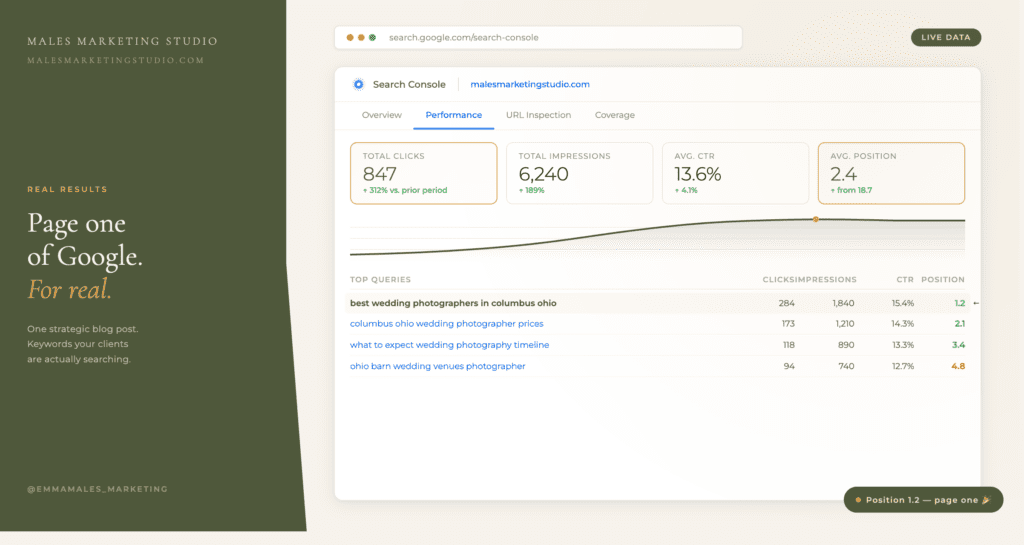
I have clients with blog posts from 2023 that still bring in inquiries every month. Not because they went viral. Because they were written with the right keyword, published on a real website, and left alone to do their job.
That is what good SEO tips for photographers actually look like in practice. Not a sprint. A system.
The Basics of SEO For Photographers Worth Doing
Before you go deep on photography SEO strategy, make sure the foundation is solid.
Your website should clearly say what you do, what kind of photography you offer, and where you work. If someone lands on your homepage and cannot tell within five seconds that you are a wedding photographer in Nashville, that is a problem worth fixing today.
For local SEO for photographers specifically, your location needs to show up naturally throughout your site. Not in a stuffed, weird way. Just clearly. City name in your page titles, your about page, your blog posts, your image alt text. Google is trying to match you with people searching in your area. Make it easy.
After that, pick one blog topic and write it. Not seventeen topics. One. Answer a real question your clients are already asking. Write it clearly. Use the keyword they would actually search.
That is a better use of your Saturday than trying to figure out your entire SEO strategy at once.
The Part Most Photographers Skip
Here is what I see happen over and over. A photographer writes a few blog posts, does not see results in two weeks, decides blogging does not work, and stops.
Blogging works. But it works like a retirement account, not a slot machine. You put something in, you leave it alone, it grows. Most of my clients start seeing real traction between 60 and 90 days after publishing a well-optimized post.
The photographers who skip this step are not lazy. They just do not have a process. They are starting from a blank page every time, guessing at topics, writing whatever feels relevant that week, and publishing with no real keyword strategy behind it.
That is why I built the free Blog Template for Photographers. It gives you the structure so the writing actually goes somewhere. You are not guessing at your H2s or wondering if you covered the right points. You open the template, follow the structure, and end up with a post that Google can actually work with.
And if you want to write faster, I use Claude to help draft and optimize. Not to replace my voice. To get a first draft done in 45 minutes instead of three hours. That is a whole other blog post, but the short version is: the template comes first, the AI fills in the words.
Ready to Start?
You do not need to become an SEO expert. You need a system you can actually stick to.
Download the free Blog Template for Photographers and come to the free live workshop on June 23rd, where I will walk you through building a real blogging system from scratch. We will do keyword research together, talk through what makes a post actually rank, and you will leave with more than just notes.
One blog post, written right, can bring in clients for years. Let’s build it together.

FAQ SECTION
What is SEO for photographers?
SEO for photographers is the process of making your photography website and content easier for Google to find and rank. It includes things like using the right keywords on your pages, writing blog posts that target specific searches, setting up your Google Business Profile, and making sure your site loads quickly. The goal is to show up when potential clients search for photographers in your area.
Does blogging actually help with photography SEO?
Yes, and it is one of the highest-impact things you can do. Each blog post creates a new indexed page on your site and a new opportunity to rank for a specific search term. Photographers who blog consistently with a keyword strategy in place tend to see steady growth in organic traffic within 60 to 90 days of publishing. One well-optimized post can bring in inquiries for years.
How long does SEO take to work for photographers?
Most photographers see meaningful results in 60 to 90 days when they are publishing keyword-researched blog posts consistently. Local SEO changes, like updating your Google Business Profile, can show results faster. SEO is not instant but it compounds. A post you publish today can still be bringing in traffic two years from now.
What are the best SEO tips for photographers just starting out?
Start with three things. Make sure your website clearly states what you do and where you work. Set up and optimize your Google Business Profile. Then write one blog post targeting a keyword your potential clients are already searching. Do not try to fix everything at once. A simple, repeatable system beats a complicated one you will abandon in three weeks.
Do I need to be techy to do SEO as a photographer?
No. The basics of photography SEO are learnable without a marketing degree or any coding knowledge. If you can write a caption and use Google, you can do this. Tools like Google Search Console are free and beginner-friendly. And a blog template takes most of the guesswork out of writing posts that are actually structured for search.
If you are ready to commit to increasing your online presence and showing up on all platforms, reach out to me and let’s have a discussion. My clients rank on Google, get found in AI search, increase their social media reach and are chosen for publications frequently. Why does this matter? Inquiries increase. Those inquiries are stronger, because your content is strategically placed in front of your ideal client. You are throwing money away if you aren’t doing this!!

